
Schedule a Meeting and Book a Room
You schedule meetings and book rooms in the same place: a new meeting in Outlook.
- Open the Outlook and select Calendar.
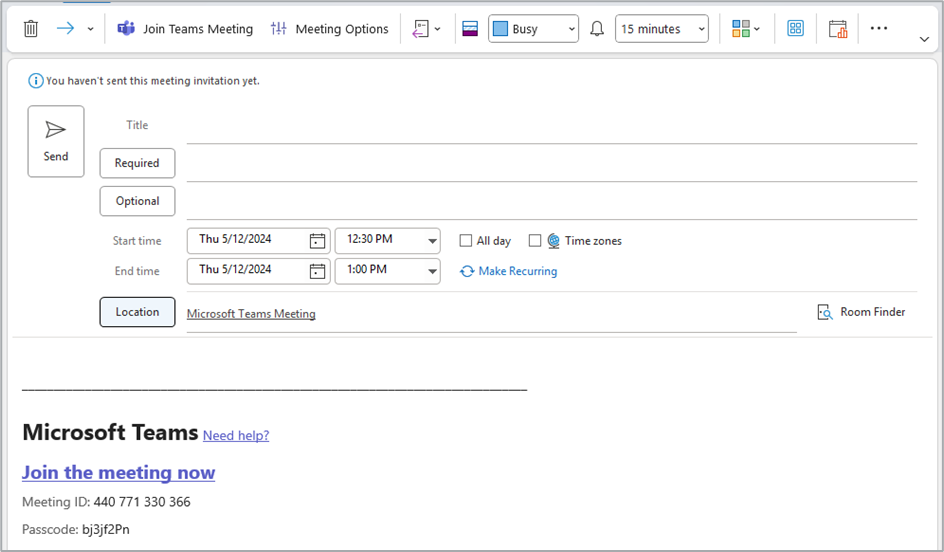
- Select New Meeting.
- Add a title, your attendees, and a short note about what the meeting is for.
- Set the date and time.
- Select Send.
Outlook adds a Teams join link automatically. If it does not appear, select Teams Meeting on the toolbar.
Book a meeting room
Add the room as the meeting location and Outlook books it for you.
- In the new meeting window, select Location.
- Find the room you want and double-click it.
- Finish the invite and select Send.
You will get an email confirming the room is booked, or telling you it is already taken.
Add the room as the location, not as an attendee. If the room is not set as the location, the touchscreen inside it will not show your meeting, and nobody will be able to start the call with one tap.
See Meeting rooms for what is available and where.
Find a time that works
Rather than guessing at availability, let Outlook show you.
- In the new meeting window, select Scheduling Assistant.
- You will see when your attendees — and the room — are free or busy.
- If nothing obvious stands out, select AutoPick and Outlook will suggest a slot.
- Choose a time and select Send.
Scheduling Assistant shows the room's availability alongside people's, so you can settle both at once instead of booking a time and then discovering no room is free.
Keeping the subject private
If the meeting topic is sensitive, mark it private so the subject does not appear on the display outside the room. See Keep a meeting subject private.