
Change Your Password
You can change your Council passphrase at any time. You do not need a reason, and you do not need to ask us.
Before you start: have any devices that use your Council account nearby — phone, tablet, second laptop. You will need to sign in again on each one.
Change it
- Open the change password page.
- Sign in with your Council account and current passphrase.
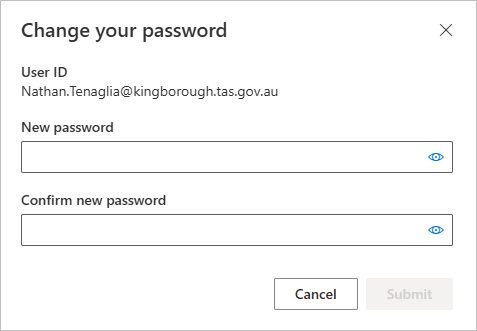
- Enter your current passphrase, then your new one twice.
- Select Submit.
What your passphrase must be
- Between 14 and 32 characters
- Not a single dictionary word
- Not a simple sequence such as
123456789 - Not built from personal information — your name, birthday, family, or the Council
- Different from passphrases you use anywhere else
Building a good one
A passphrase is four or more unrelated words. Longer beats complicated: length is what defeats guessing, not swapping letters for symbols.
The trick is that the words must be unrelated to each other and to you. Pick things you can see from where you are sitting, or open a book at random and take a word from four different pages. What makes it strong is that nothing connects them. For example: skittlesbottlephonetissue
Avoid song lyrics, film titles, sayings and quotes — they are the first thing attackers try, and a familiar phrase is not random however long it is.
Do not reuse it. If a passphrase leaks from somewhere else, anything sharing it goes too. If you struggle to keep track, that is exactly what 1Password is for.
After you change it
You will need to sign in again everywhere. Work through this list, or you will get sign-in prompts and sync failures for days:
- Your work laptop or desktop
- Outlook, Teams and OneDrive on your phone
- Any tablet
- A second computer, if you have one
- Any personal device with Council email on it
Most of these will also ask you to approve a multifactor prompt.
If you miss one, apps on that device may stop syncing or prompt repeatedly. Repeated failed sign-ins from a forgotten device can also lock your account.