
ECM Pools
TechnologyOne’s Enterprise Content Manager (ECM) is a secure digital filing system that helps Kingborough Council store, organise, and access documents easily. It replaces paper-based records with a centralised online system, making it simple to find, share, and manage files. ECM ensures documents are kept safe, meet compliance requirements, and can be accessed anytime, from anywhere.
In This Document
What is a Pool
A Pool is a group of people assigned to manage tasks related to a specific function within the Council. Pools ensure that tasks are always visible to someone, even during staff absences.
Structure of a Pool
Each Pool includes various user permissions, which are assigned by the department head. Typically, managers have more functions available than other team members. However, the Information Management team can modify these permissions if needed.
For example, in the stormwater team, all members currently have full permissions (as visible to system administrators but not end users).

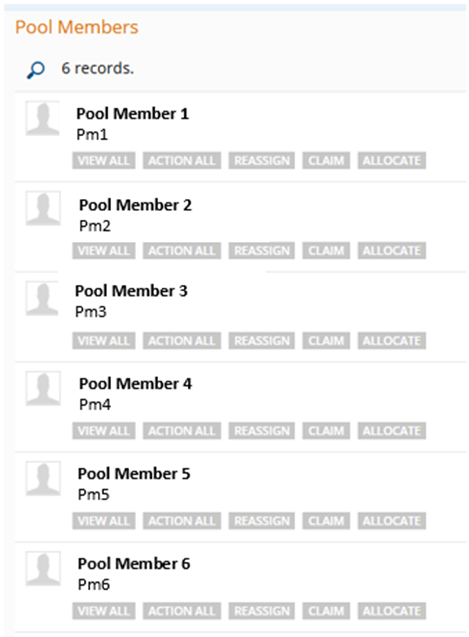
Functions within a Pool
Each Pool has several available functions:
- View All
- Action All
- Reassign
- Claim
- Allocate
All members of a Pool will have access to at least View All, Action All, and Claim.
View All
Allows users to view documents within the Pool. This function is required for all Pool members.
Action All
Enables users to complete tasks, such as adding notes and closing tasks. If a user only needs visibility without the ability to complete tasks, this function can be removed.
Reassign
Allows users to assign tasks to someone outside the Pool. If a task is incorrectly assigned to the department, this function enables reallocation. However, it is often preferable to complete the task and create a follow-up task for the correct department, as this ensures a clearer task history.
Claim
Enables a user to claim a task from the Pool, making it visible only to them. The task will then appear in a separate section labeled With: [USER NAME] – ECM – [POOL NAME]. While available to all Pool users, some teams may prefer to indicate task ownership by adding their name to the task description instead.
Allocate
Allows a user to assign a task to someone within the Pool. Typically, this function is reserved for managers but can be made available to other team members as needed.
Filtering Tasks
Users can filter their task list to view only relevant items. For details, refer to the Task List and Filtering Tasks help guide.
Creation of New Pools
New Pools can be created by the Information Management team when there is a clear division of tasks. If a sub-team requires a dedicated Pool, the Information Management team will:
- Create the new Pool
- Add the appropriate users
- Assign relevant functions
Note: The Information Management team should not be responsible for determining task assignments. If Pool functions are unclear, it can complicate task allocation. Pools are designed to streamline tasking and ensure visibility for the appropriate personnel.
For any changes to existing Pools or their functions, contact the Information Management team.
List of Pools
The following is a list of current Pools (accurate as of the last update):
- ECM – 337 – Building
- ECM – 337 – Certificates
- ECM – 337 – Community Development
- ECM – 337 – Engineering
- ECM – 337 – Health
- ECM – 337 – Planning
- ECM – 337 – Plumbing
- ECM – Building Department
- ECM – Accounts Payable – Invoices
- ECM – High Performance – AFL
- ECM – AWTS Reports
- ECM – EMT Business Case
- ECM – Climate Change
- ECM – Community Development and Hub
- ECM – Community Development – Volunteer Program
- ECM – Complaints
- ECM – Kingborough Integrated Transport Strategy Consult
- ECM – CS – Applications – Customer Service
- ECM – Depot – Building Maintenance
- ECM – Depot – General Administration
- ECM – Depot – Plant and Fleet
- ECM – Depot – Parks and Reserves
- ECM – Depot – Roads
- ECM – Development Engineering
- ECM – Compliance
- ECM – Duty Planner New Applications
- ECM – Emergency Management
- ECM – Enforcement
- ECM – Engineering – Design
- ECM – Engineering – Project
- ECM – Engineering – Admin
- ECM – Engineering – Asset
- ECM – Engineering – KWS
- ECM – Roads Engineering
- ECM – Community Events Permits
- ECM – Food
- ECM – Infringements – Compliance
- ECM – IT
- ECM – Kingborough Sports Centre KSC
- ECM – Compliance – Legal, Property and Governance
- ECM – LPS Enquiries (Exhibition Period Only)
- ECM – LPS Representations (Exhibition Period Only)
- ECM – MANEX
- ECM – NAB – General Pool
- ECM – NAB – Cats
(This list may not be exhaustive and is subject to change.)